Remote User Profile
Added in v0.4.0
Pody can use another Pody server as the source of truth for user accounts.
This feature is useful when you run multiple nodes in a cluster and want to:
- keep one shared user database;
- authenticate users against a central server;
- avoid creating the same users separately on every node.
The feature has two sides:
enable service: exposes the local user database through a protected HTTP API;enable provider: consumes that API from another Pody server.
What it affects
When remote_user_profile.provider.enabled = true, Pody switches UserDatabase() from the local SQLite database to the remote provider.
That means the following operations on the consumer node use the remote user database:
- user authentication;
- user listing;
- password changes;
- CLI user-management commands such as
pody-user add,update,list, anddelete.
NOTE
- user quota is still local to each server. Remote user profiles only replace the user-account backend; they do not synchronize quota settings.
- user management may not always work through the provider. If
remote_user_profile.service.readonly = true, then the consumer server can only read user profiles but cannot create, update, or delete users through the service API. In that case, you must manage users directly on the service node.
Topology
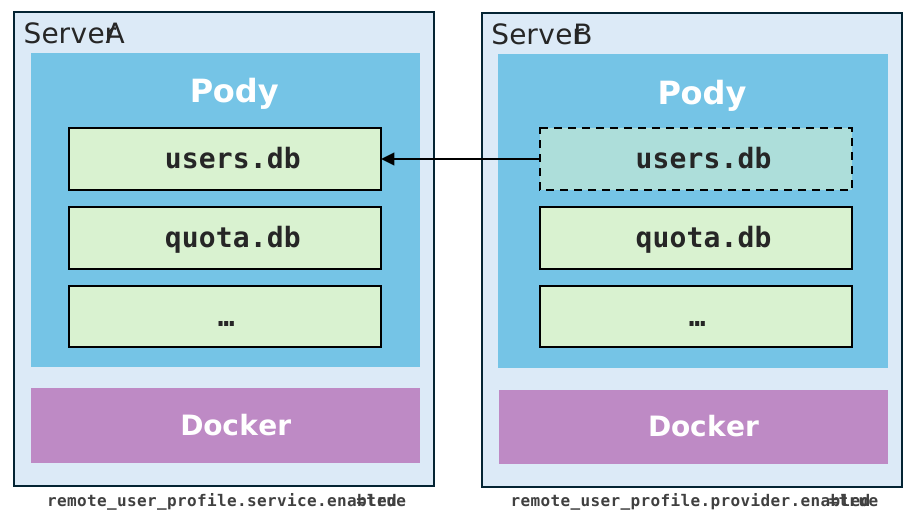
Typical deployment:
- Server A: keeps the real user database and enables
remote_user_profile.service. - Server B: enables
remote_user_profile.providerand points to Server A. Users on Server B are authenticated against the user database on Server A.
Service (provider) side
Enable the service on the server that owns the user database.
Edit $PODY_HOME/config.toml:
[remote_user_profile.service]
enabled = true
readonly = true
access_token = "replace-with-a-long-random-token"
Use readonly = true if other nodes should only read users from this server. Set to false if you want to allow other nodes to create, update, or delete users.
Client (consumer) side
Enable the provider on the consumer server.
Edit $PODY_HOME/config.toml:
[remote_user_profile.provider]
enabled = true
endpoint = "http://server-a.example.com:8799"
access_token = "replace-with-the-same-token-used-by-the-service"
Security notes
This feature is simple by design, so you should treat it as an internal service interface.
- Use a long random token for
access_token. - Prefer a trusted private network or HTTPS reverse proxy between clusters.
- Keep
readonly = trueunless you explicitly want remote nodes to create, modify, or delete users.